
Why this tutorial
There are several cases where this process is beneficial, either to save time or because there’s simply no other way. Here are a few typical scenarios:
- Creating Geometrically Perfect Textures:
Some areas, like airports, require nearly perfect geometric surface textures. Airport ground textures, for instance, are usually composed of geometric shapes.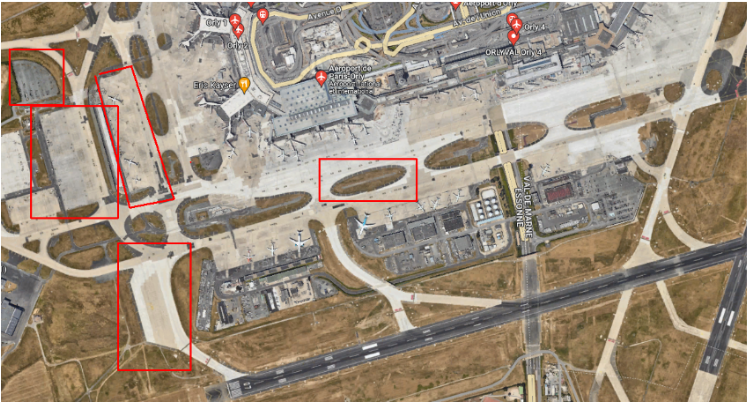
- Mass Texture Generation:
If you need to create large areas without manually painting each one individually, like agricultural field checkers, this process is invaluable. Doing this by hand over half your terrain would be a massive task!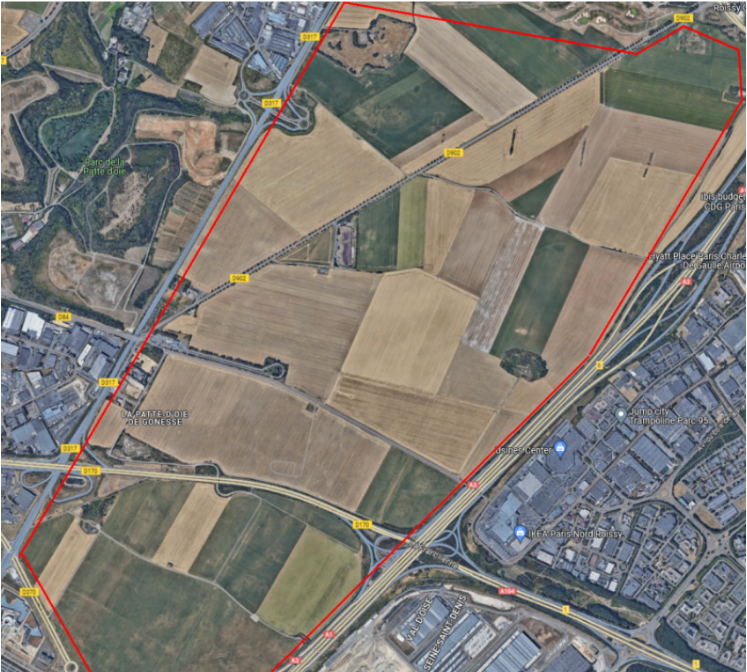
- Specific Road Textures:
For textures under road generators, especially for “runway” types, the standard road generation method (exporting surface masks, generating the satmap, importing with “generate roads” enabled) doesn’t support this particular texture type. Unfortunately, there’s currently no straightforward way to draw perfectly geometric shapes with the Paint tool. If I’m wrong, please correct me!
In these cases, the “least bad” solution is to work with surface masks.
No comments to display
No comments to display