
Make a landing gear system for a helicopter
Introduction
The idea is to use the basic car trunk script from Bohemia's tutorial, modifying it to move (translate/rotate) a bone in the skeleton.
(you can download the basic car and see how the make the trunk function) you can go see the vertex part here: tutorial vertex and anim
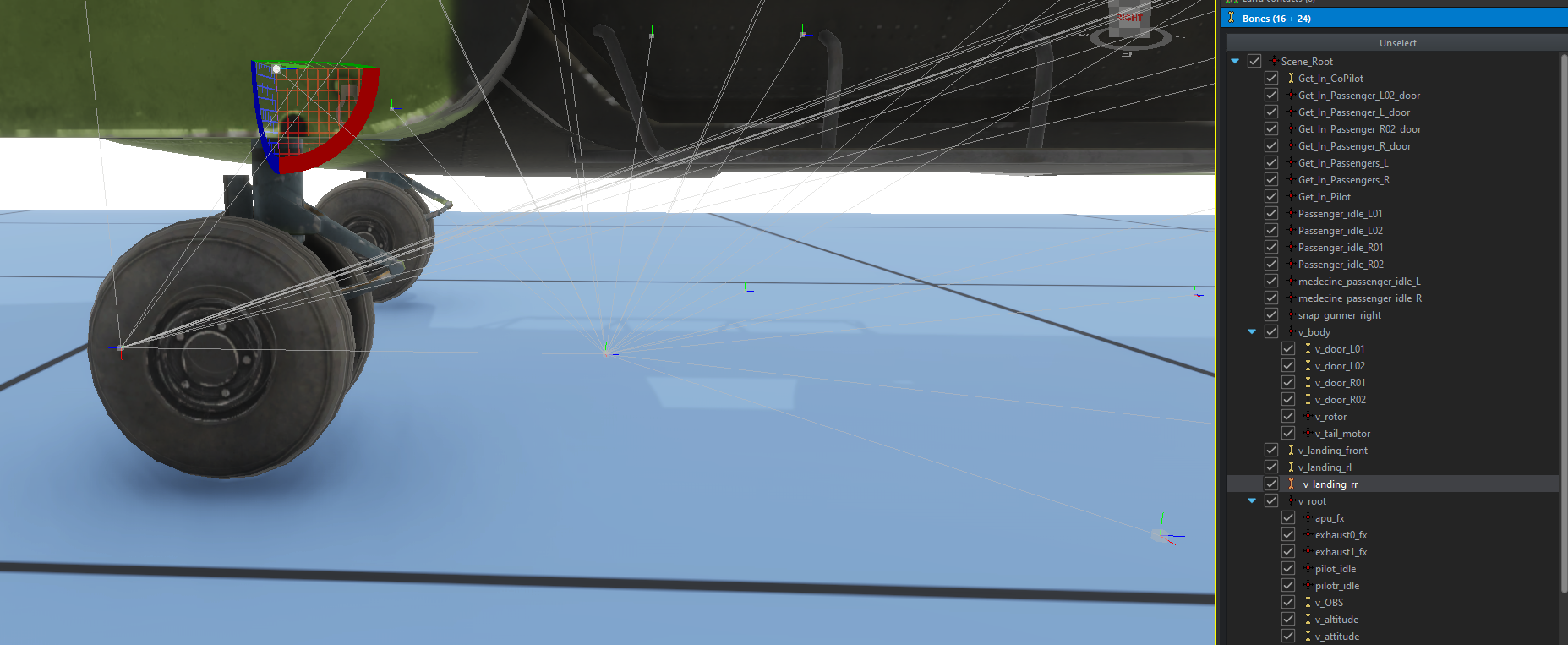
1. skeleton and bone
PourTo fairemake l'the animation, una bone etand una vertex group doitmust êtrebe crée.created. DansIn lethe tutoriel,tutorial, lethe bone quithat vawill fairemake bougerthe lawheel rouemove vawill s'appelerbe "v_landing_rr"called “v_landing_rr” (vousyou pouvezcan bienof sûrcourse lename nommerit commeanything vousyou lelike). voulez).
2. LesProcedural fichiersanimation d'animations procéduralesfiles
VousYou pouvezcan retrouverfind cesthese deuxtwo fichiersfiles enattached pièceat jointesthe enbottom basof dethis cetutorial, tutoriel,you voushave avezthe leright droitto deuse lesthem utiliser librementfreely (vousyou pouvezcan nouscredit créditerus siif vousyou le souhaitezwish 👍).
VousYou pouvezcan lesplace placerthem dansin "“{YOUR_ADDON}/anims"anims”.
Rappel:Reminder: ExplicationsExplanations duof fonctionnementhow desprocedural animations procédurales:work:
1. lethe .siga file
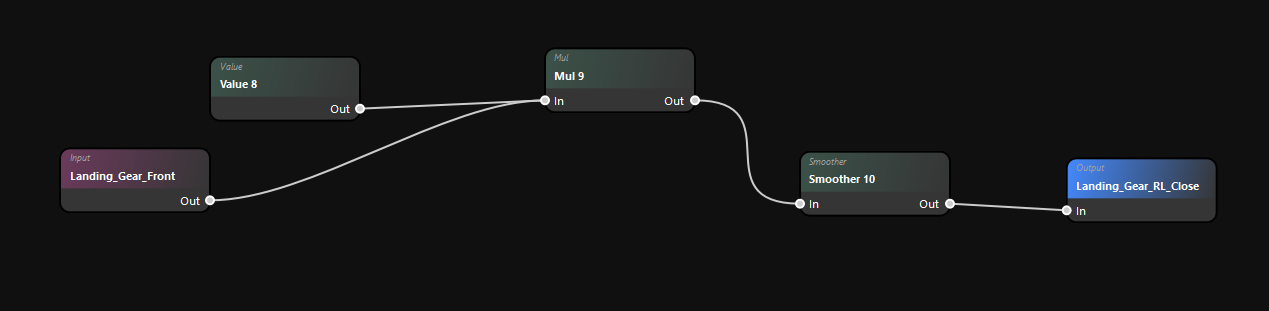
L'The imputestisle lanceur duthe signalpourlauncherl'for the animation ⚡- Value 8
correspondcorrespondsàtolathe maximum rotationmaxofdethel'animationeninpratiquepractice (-80°). - Smoother 10
permetsoftensd'adoucir l'animationpourtoéviterpreventqu'elleitsoitfromtropbeingbrutaletoo rough
2. L'animationthe .pap file
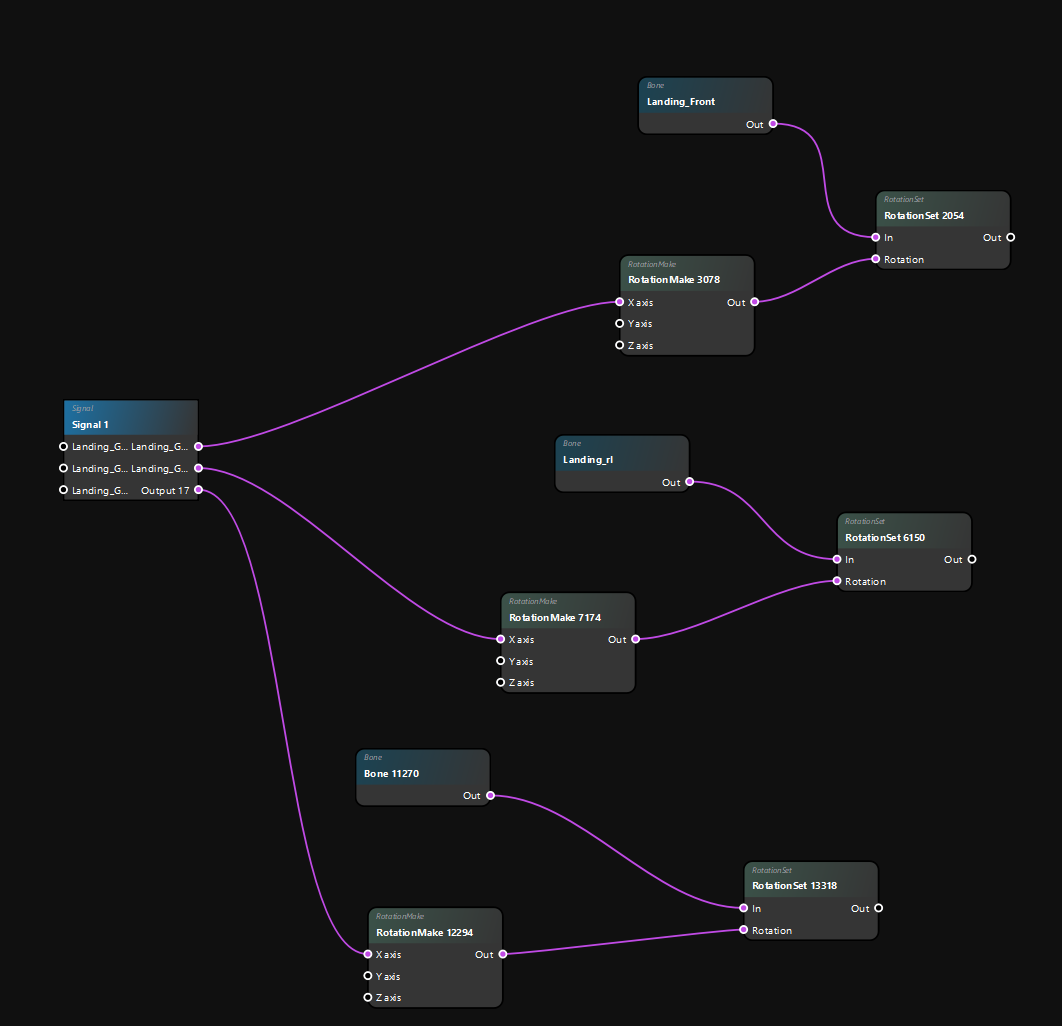
- Signal 1:
PermetUseddetofaire le lien entre le fichierlink .sigaet leand .pap,paponfiles,peux y trouver deswith portspourforfairelinkingdestoliensanimationavec les instructions d'animationsinstructions. - Rotation
MakeMake:permettellsdeyoudiretodeperformréaliser lathe rotation - RotationSet:
PermetAllowsdeyouconfigurertolaconfigure rotation (notammentinpourparticulardéfinirtosidefineouiwhetherouornonnotontomet à jour lesupdate colliders). - Bone:
DéfinitDefinesl'oswhichquibonevawillbougermove
Tips: EnBy cliquantclicking dansin lethe vide,background, vousyou pouvezcan définirdefine unan modèleexample d'exemplemodel, etand avecwith lathe fenêtre "“signal simulation",simulation” vouswindow, pouvezyou testercan entest direct votreyour animation
live.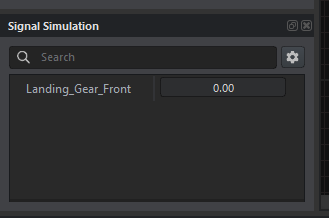
3. Les actions pour pouvoir déclencher l'animation
1. CréerCreate l'action Landing_Gears"Landing_Gears"
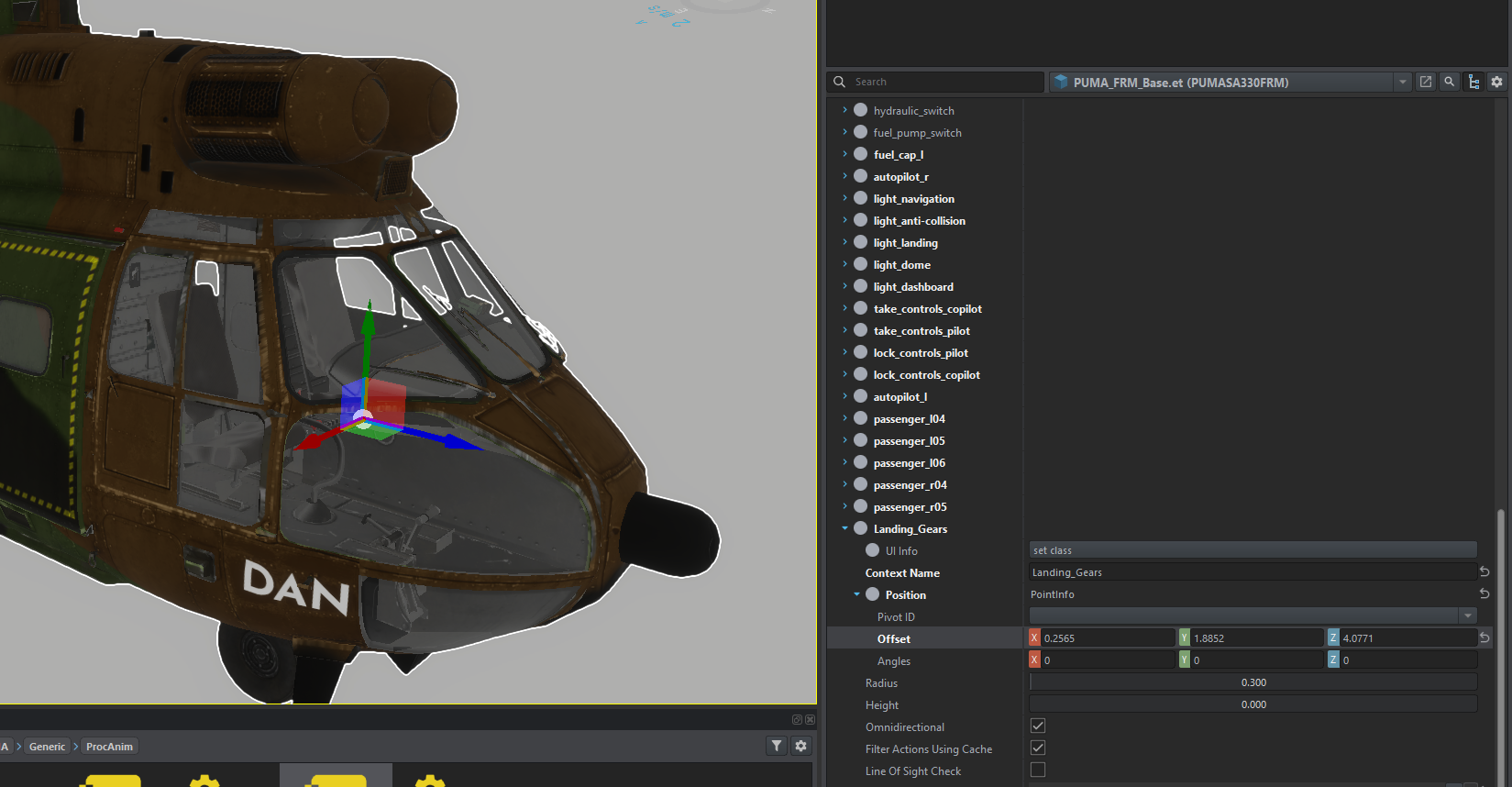
1. CréerCreate l'Additional Action
Add the “SCR_TrunkUserAction” additional action additionnelwith
Ajoutezthe l'action additionnel "SCR_TrunkUserAction" avec le petitsmall + dein lathe catégorie“Additional "AdditionnalActions” Actions"category dansto lethe component ActionManagerComponentActionManagerComponent.
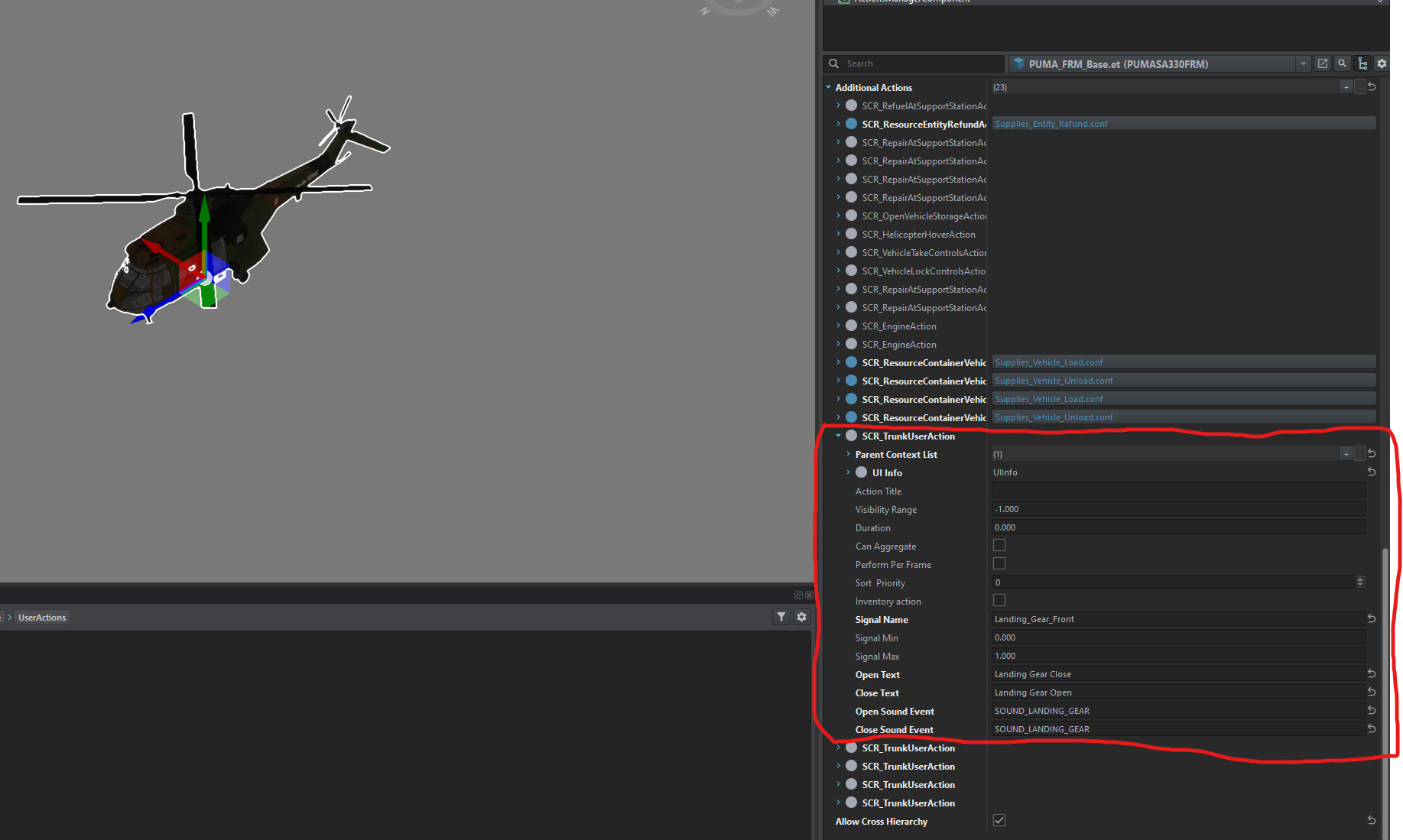
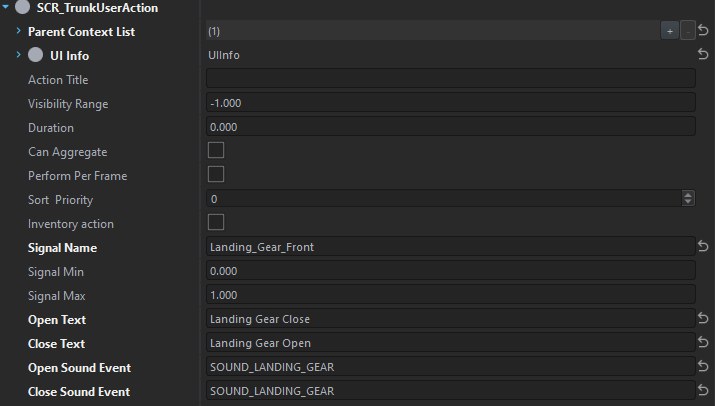
UneOnce foiscreated, crée,all vousyou avezhave plusto qu'ado mettreis cesput paramètresthese dansparameters l'into action:
DansIn"“Parent ContextList"List”,mettezsetl'the actionqueyouvouscreatedavez crée plus hautabove- Signal Name
vawillporterbelethenomnamequeyouvoushaveavezdefineddéfiniindans le fichierthe signal file (.siga).
4. Le scriptScript
Rappel:Reminder: PourFor que lethe script soitto prisbe entaken compte,into ilaccount, doitit semust trouverbe danslocated auin minimumat unleast dossierone "“scripts/Game/UserActions"UserActions” folder.
CréerCreate un fichiera script dansfile cein répertoirethis quidirectory s'appellecalled "“SCR_CarTrunkUserAction.c"c”, ouvrezopen leit puisand mettezput ythis cela:in it:
//French Reforger Mod - Landing Gears tutorial

class SCR_TrunkUserAction : ScriptedUserAction
{
	[Attribute(defvalue: "Drawer 1", uiwidget: UIWidgets.EditBox, desc: "Signal name of trunk action in procedural animation project")]
	protected string m_sSignalName;	//for pairing with the user action

	[Attribute(defvalue: "0", uiwidget: UIWidgets.EditBox, desc: "Value of signal when trunk is closed")]
	protected float m_fSignalMin;

	[Attribute(defvalue: "1", uiwidget: UIWidgets.EditBox, desc: "Value of signal when trunk is opened")]
	protected float m_fSignalMax;

	[Attribute(defvalue: "Open", uiwidget: UIWidgets.EditBox, desc: "Text for the 'Open' action")]
	protected string m_sOpenText;  // Texte pour l'action "Open"

	[Attribute(defvalue: "Close", uiwidget: UIWidgets.EditBox, desc: "Text for the 'Close' action")]
	protected string m_sCloseText;  // Texte pour l'action "Close"

	[Attribute(defvalue: "SOUND_CONTAINER_OPEN", uiwidget: UIWidgets.EditBox, desc: "Sound event name when opening")]
	protected string m_sOpenSoundEvent;  // Événement sonore pour l'ouverture

	[Attribute(defvalue: "SOUND_CONTAINER_CLOSE", uiwidget: UIWidgets.EditBox, desc: "Sound event name when closing")]
	protected string m_sCloseSoundEvent;  // Événement sonore pour la fermeture

	protected int m_iSignalIndex = -1;

	//! Signal manager to pass signals into proc anim
	private SignalsManagerComponent m_SignalsManager;
	//! Sound component
	private SCR_VehicleSoundComponent m_SoundComponent;

	//------------------------------------------------------------------------------------------------
	override bool CanBeShownScript(IEntity user)
	{
		return CanBePerformedScript(user);
	}

	//------------------------------------------------------------------------------------------------
	override bool CanBePerformedScript(IEntity user)
	{
		if(!m_SignalsManager)
			return false;

		if (m_iSignalIndex < 0)
		{
			m_iSignalIndex = m_SignalsManager.FindSignal(m_sSignalName);
			return false;
		}

		return true;
	}

	//---------------------------------------------------------
	override void PerformAction(IEntity pOwnerEntity, IEntity pUserEntity)
	{
		float targetValue = Math.AbsFloat((m_SignalsManager.GetSignalValue(m_iSignalIndex)) - m_fSignalMax);
		m_SignalsManager.SetSignalValue(m_iSignalIndex, targetValue);

		// Play sound
		if (m_SoundComponent)
		{
			if(targetValue > 0)
			{
				m_SoundComponent.SoundEvent(m_sOpenSoundEvent);  // Utilise l'événement sonore défini pour l'ouverture
			}
			else
			{
				m_SoundComponent.SoundEvent(m_sCloseSoundEvent);  // Utilise l'événement sonore défini pour la fermeture
			}
		}
	}

	//------------------------------------------------------------------------------------------------
	override bool GetActionNameScript(out string outName)
	{
		if((m_SignalsManager.GetSignalValue(m_iSignalIndex)) == 0)
		{
			outName = m_sOpenText;  // Utilise le texte défini pour l'ouverture
		} else
		{
			outName = m_sCloseText;  // Utilise le texte défini pour la fermeture
		}
		return true;
	}

	//------------------------------------------------------------------------------------------------
	override void Init(IEntity pOwnerEntity, GenericComponent pManagerComponent)
	{
		m_SignalsManager = SignalsManagerComponent.Cast(pOwnerEntity.FindComponent(SignalsManagerComponent));
		m_SoundComponent = SCR_VehicleSoundComponent.Cast(pOwnerEntity.FindComponent(SCR_VehicleSoundComponent));
	}
}
UneOnce foisyou've toutdone cethis tutorieltutorial, fait,you vouscan pouvezrestart entièrement redémarrer lethe workbench etand siif vousyou've avezdone bieneverything toutright, fait,the leswheels rouesshould devraientmove. seNow déplacer,it's àup vousto maintenantyou deto fairemake ensure sortethey qu'elle le face biendo ^^.
Translated with DeepL by Lucas - 11/20/24