based on the message: [https://discord.com/channels/105462288051380224/1050433454388547644/1356396266107437237](https://discord.com/channels/105462288051380224/1050433454388547644/1356396266107437237)
Requirement: ****CRX Enfusion A.I. ( STABLE 1.3 Update v.1.3.14 )****
****1. you will need to add thsi to your config of your dedicated server:**** **"missionHeader": {** **"m\_CRX\_Settings": {** **"m\_bIsCRX": true,** **"m\_fWeaponFiredReactionDistance": 500,** **"m\_fSuppressedWeaponFiredAudibleDistance": 100,** **"m\_bInvestigate": true,** **"m\_eCombatMode": "YELLOW",** **"m\_bSuppress": true,** **"m\_fPerceptionSafe": 1.0,** **"m\_fPerceptionVigilant": 3.0,** **"m\_fAimAccuracyErrorModifier": 0.0** **}** **}** ****2. it will have somethin like that:**** [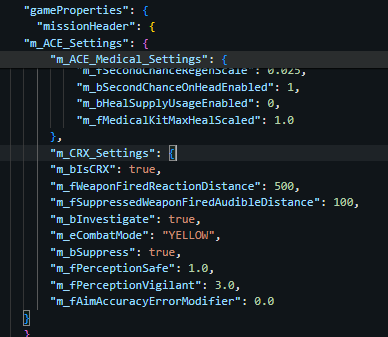](https://wiki.nabla.sh/uploads/images/gallery/2025-04/hcfimage.png) ****3. Tweak the setting as you wish****| Parameter Name | Default Value | Simple Description | In-Game Effect |
|---|---|---|---|
| `m_bIsCRX` | `true` | Enables CRX-specific settings | Signals that CRX AI settings are active for this mission. Can be used by other scripts to toggle CRX-related features. |
| `m_fWeaponFiredReactionDistance` | `500` | Distance (in meters) within which AI groups react to unsuppressed gunfire | Higher values make AI detect and react to gunfire from farther away. They may become alert, take cover, or move toward the sound source. |
| `m_fSuppressedWeaponFiredAudibleDistance` | `100` | Distance (in meters) within which AI can hear ****suppressed**** gunfire | Controls how well AI detect suppressed gunfire. Useful for stealth missions — lower values mean better stealth, higher values mean AI are more aware of silent shots. |
| `m_bInvestigate` | `true` | Enables AI investigation behavior | If enabled, AI will investigate suspicious events like gunshots, dead bodies, or enemy presence. Makes AI behave more intelligently and realistically. |
| `m_eCombatMode` | `"YELLOW"` | Initial combat readiness mode for AI | Controls how alert AI are: `YELLOW` means alert but not engaged, `RED` means fully engaged in combat, etc. Affects how quickly they react to enemies and how they patrol or hold positions. |
| `m_bSuppress` | `true` | Enables AI suppression fire behavior | If enabled, AI will use suppressive fire tactics — shooting to pin enemies down rather than aiming directly, especially in combat or ambush situations. |
| `m_fPerceptionSafe` | `1.0` | AI perception level in **safe** (idle/patrolling) state | Higher values mean AI will more easily notice small sounds or movements while in relaxed or non-alert states. |
| `m_fPerceptionVigilant` | `3.0` | AI perception level in **vigilant** (alert but not engaged) state | Similar to above but applies during heightened alert status. The higher the value, the more easily AI spot threats even before direct engagement. |
| `m_fAimAccuracyErrorModifier` | `0.0` | Modifies AI aim accuracy error. Positive = worse aim, Negative = better aim | Adjusts AI shooting skill: `+1.0` makes them miss more often, `-0.5` makes them more accurate than default. Useful to tweak AI difficulty based on your mission or gameplay balance. |